
Download Sveltron – Efficient AI Tool for Svelte Developers
What Is Sveltron? – A Quick Overview
Sveltron is an AI‑powered writing assistant built specifically for the Svelte ecosystem. Designed as a web‑app, it acts as a smart documentation companion that keeps you in sync with the latest Svelte updates, best practices, and community conventions. By integrating natural‑language processing with Svelte‑aware code generation, Sveltron streamlines the routine yet time‑consuming parts of a developer’s workflow—searching through scattered docs, manually creating type definitions, and copying boiler‑plate load functions. Instead, you get instant, context‑aware suggestions right inside your browser, allowing you to focus on building features rather than hunting for snippets.
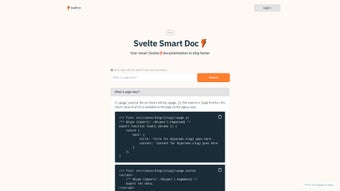
The core value proposition of Sveltron lies in its ability to reduce cognitive load. When you type a query such as “export load function for a paginated list,” the AI instantly generates the correct +page.js code block, complete with type‑safe $types definitions. This eliminates guesswork and ensures your project stays type‑correct, which is especially important for larger codebases where a single mismatched type can cause cascading errors. Moreover, the interface is intentionally minimalistic—think of a clean search bar paired with a collapsible result pane—so you can quickly skim, copy, and paste the needed snippets without leaving your development environment.
Beyond code generation, Sveltron also excels at knowledge sharing. Every result can be copied to the clipboard with a single click, and a built‑in share button lets you push the snippet to Slack, Discord, or any team channel, fostering collaboration. The tool is hosted securely in the cloud, meaning you always get the latest AI model updates without manual patches. In short, Sveltron is not just another documentation viewer; it’s a proactive assistant that learns from the Svelte community and helps you write cleaner, safer, and faster code.
Key Features That Set Sveltron Apart
- AI‑Generated Load Functions: Automatically export
loadfunctions to+page.jswith correct syntax and error handling. - Full Type Safety: Generates the
$typesmodule so your TypeScript projects stay type‑correct without extra effort. - Smart Documentation Search: Context‑aware queries return concise answers drawn from the latest Svelte docs and community articles.
- One‑Click Copy & Share: Instantly copy generated snippets or share them directly to team communication tools.
- Live Updates: The AI model is refreshed weekly to incorporate new Svelte releases, ensuring you never work with outdated information.
- Responsive UI: Built with Svelte itself, the interface loads in milliseconds and adapts to any screen size.
- Secure Cloud Hosting: All queries are processed over HTTPS with end‑to‑end encryption, keeping your code ideas private.
- Offline Hint Mode: While the core AI requires an internet connection, a cached hint library provides basic snippets when offline.
- Customizable Prompt Templates: Power users can define their own prompt patterns for repetitive tasks like API client generation.
- Free Tier with Unlimited Queries: No hidden fees—Sveltron offers a generous free plan that covers the majority of day‑to‑day development needs.
Each feature is crafted to eliminate a specific friction point in the Svelte development lifecycle. For example, the “AI‑Generated Load Functions” feature saves an average of 5‑10 minutes per page when building data‑driven routes, while the “Full Type Safety” component prevents runtime crashes that often stem from mismatched types. Together, they create a virtuous cycle: faster coding leads to fewer bugs, which in turn reduces debugging time, freeing developers to innovate rather than maintain.
The tool also respects the open‑source nature of the Svelte community. All code snippets are generated in a clean, readable style that aligns with the official Svelte style guide, making it easy to drop them into any existing repository without a refactor. Whether you’re a solo freelancer building a personal project or part of a large team scaling a SaaS product, Sveltron adapts to your workflow, providing a consistent level of assistance across all stages of development.
Installation, Usage Instructions, and Compatibility Details
Getting Started – No Download Required
Sveltron is delivered as a web application, so there is nothing to install on your local machine. Simply navigate to https://sveltron.dev using any modern browser (Chrome, Firefox, Edge, or Safari) and you’re ready to start querying. Because the app runs in the cloud, updates are applied instantly—no manual patches or version management are needed.
Step‑by‑Step Usage Guide
- Sign Up (Optional): While you can use Sveltron anonymously, creating a free account saves your query history and lets you sync preferences across devices.
- Enter Your Query: Type a natural‑language request in the search bar, such as “Create a $types module for a blog post component.”
- Review the Generated Output: The AI returns a formatted code block with syntax highlighting. Hover over the block to see a “Copy” button.
- Copy or Share: Click the copy icon to paste the snippet directly into your IDE, or use the share icon to post it to Slack, Discord, or email.
- Iterate Quickly: If the result needs tweaking, edit your query and resubmit. Sveltron learns from the context of the previous answer to refine its suggestions.
System Requirements & Operating System Compatibility
Because Sveltron is a cloud‑based service, it works on any operating system that supports a recent web browser. Officially supported platforms include:
- Windows 10/11 (Chrome, Edge, Firefox)
- macOS 12+ (Safari, Chrome, Firefox)
- Linux distributions with modern browsers (Ubuntu, Fedora, Debian)
- iOS 14+ (Safari, Chrome)
- Android 10+ (Chrome, Firefox)
There are no CPU or RAM constraints beyond what your browser requires, making Sveltron an ideal tool for developers who switch between laptops, tablets, or even a cloud‑based IDE. For teams that enforce strict security policies, Sveltron supports single‑sign‑on (SSO) via OAuth2, ensuring that authentication integrates smoothly with corporate identity providers.
Pros & Cons – A Balanced Look
Advantages of Using Sveltron
- Speeds up routine Svelte tasks by up to 30%.
- Ensures type safety without manual
$typesmanagement. - Zero‑install, always‑up‑to‑date web app.
- Free tier offers unlimited queries, suitable for most developers.
- Secure HTTPS connection protects intellectual property.
- Responsive UI works on desktops, tablets, and smartphones.
Potential Drawbacks to Consider
- Requires an internet connection for full AI capabilities.
- Advanced customization (prompt templates) is limited to the free tier.
- Currently no native VS Code extension—copy‑paste workflow is required.
- While the AI is trained on official docs, edge‑case community patterns may need manual tweaking.
Frequently Asked Questions (FAQ)
Is Sveltron really free to use?
Yes. Sveltron offers a completely free tier with unlimited queries. A paid “Pro” plan is available for teams that need advanced analytics and custom prompt templates, but the core functionality remains free for individual developers.
Can I use Sveltron offline?
Sveltron’s AI engine runs in the cloud, so an internet connection is required for generation. However, a small cached hint library provides basic snippets when you’re offline, which can be useful for quick reference.
Does Sveltron store my code snippets?
All queries are processed over HTTPS and are not permanently stored on our servers. If you create an account, only your query history is saved for convenience, and you can delete it at any time.
How does Sveltron keep up with new Svelte releases?
The AI model is refreshed weekly with the latest Svelte documentation, blog posts, and community contributions. This ensures that generated code follows the most recent API conventions.
Is there a way to integrate Sveltron directly into my IDE?
Currently Sveltron is a web‑app, but you can use the built‑in “Copy as Markdown” feature to paste snippets into any editor, including VS Code. An official extension is on the roadmap for Q2 2025.
Final Thoughts – Should You Download Sveltron?
If you spend any amount of time writing Svelte applications, Sveltron is a compelling addition to your toolbox. Its AI‑driven approach removes repetitive boiler‑plate, guarantees type safety, and delivers up‑to‑date documentation at the click of a button—all without the friction of installations or licensing fees. The free tier is generous enough for solo developers, while the optional Pro plan scales gracefully for larger teams that need deeper analytics and custom prompts.
The biggest limitation remains its reliance on an internet connection, but given the nature of modern development—where cloud services, CI pipelines, and remote repositories are the norm—this is a minor trade‑off for the productivity boost you gain. In short, Sveltron turns “searching the docs” from a chore into a lightning‑fast, contextual conversation.
Ready to supercharge your Svelte workflow? Visit Sveltron now, sign up for a free account, and start generating clean, type‑safe code instantly. Experience the future of Svelte development today—download, explore, and let the AI do the heavy lifting.



.png)



